Launch without leaving the keyboard
Hold your trigger key, flick toward what you want, and release. The app, file, or folder opens before your hand moves back to the mouse.
 WRADIAL
Windows radial workflows
WRADIAL
Windows radial workflows
Free download for Windows
Your apps, one gesture away. Hold a trigger key, flick toward what you want, and launch apps, shortcuts, text snippets, and commands precisely, without leaving the keyboard.
Windows may show a SmartScreen prompt on first run. Click “More info” then “Run anyway” -- the installer is code-signed and SHA-256 verified.
How it works
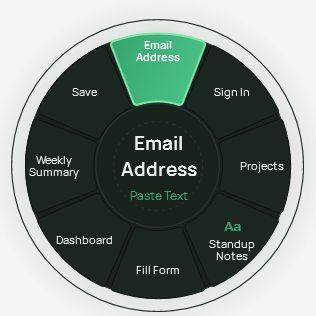
Hold your trigger key and flick toward an app. It opens before your hand leaves the keyboard.
Hold your trigger key, flick toward what you want, and release. The app, file, or folder opens before your hand moves back to the mouse.
Build a wheel per app and assign apps, shortcuts, text snippets, scripts, and commands to any direction. You get one wheel on the free tier, or as many as you run with a Pro key.
Every build is code-signed and SHA-256 verified. The hash is published beside the installer, so you can match it before you run it.
Get-FileHash .\Wradial-Setup-x64.exe -Algorithm SHA256Compare the result with the hash published beside the installer at Wradial-Setup-x64.exe.sha256. A match means the bytes are exactly what we signed.
Watch
Two short films: the whole product in about a minute, and one sequence run start to finish. Nothing loads until you press play.
The whole product in about a minute. It ends in the editor, where you build the wheel you flick.
Windows may show a SmartScreen prompt on first run. Click “More info” then “Run anyway” -- the installer is code-signed and SHA-256 verified.
One slot runs a whole form. The preview that asks first, the progress card, and a three-record batch with its receipts.
Windows may show a SmartScreen prompt on first run. Click “More info” then “Run anyway” -- the installer is code-signed and SHA-256 verified.